
ERP Compatibility
Infor® VISUAL® Manufacturing ERP / Infor® VISUAL® Enterprise ERP / Infor® 10 ERP ExpressPricing
Please contact us for pricingDisclaimer
VISUAL is a registered trademark of Infor.Precious Material Surcharging
This utility for Infor VISUAL© Enterprise / Infor 10 ERP Express allows you to automatically apply advanced surcharges to your orders at the time of shipment.
Description
For example, a copper or fuel surcharge. You start off by defining your precious materials in Part Maintenance by marking a user defined field of your choice with the letter 'P'. The unit price for this field will be the surcharge amount and two other user defined fields can be specified as multipliers and adders (described later). For easy maintenance, we include a custom screen to update all of your defined surcharges in one place:
Next you use Precious Material Association to associate these precious materials with other parts in Visual® Manufacturing:
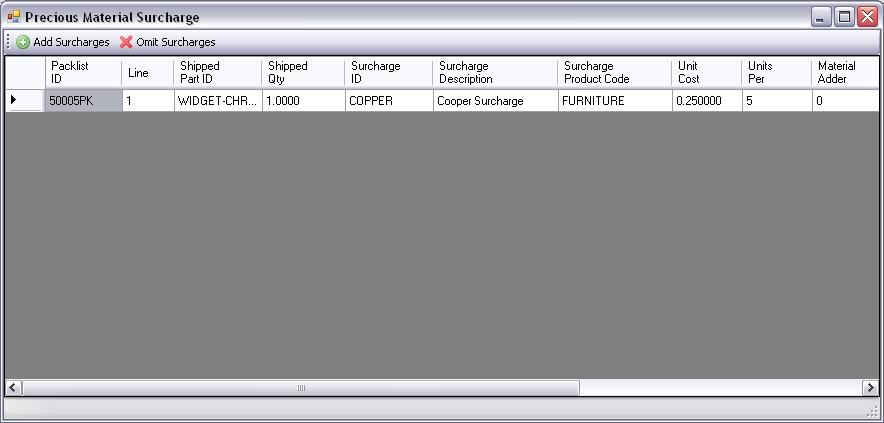
So here I am saying any time I sell WIDGET-CHROME, I should apply 5 units of the surcharge COPPER to the order. The last piece of the solution comes in the form of a macro in the shipping entry window that applies these surcharges to the order when a shipment is saved. This functionality can be configured to run silently or interactively (interactive shown here):
In this interactive mode, surcharges can be updated or removed on the fly. When done editing, click the Add Surcharges button and those surcharges are added to the order. In this scenario, we used a simple surcharge with no multipliers or adders - just $0.25 with 5 units per the 1 unit shipped, so the surcharge came to $1.25. However, if you need more flexibility the multipliers and adders are available:
- Adders allow you to add on a fixed dollar amount to the unit cost of the surcharge. For example, if we had an adder of $1 defined for the COPPER surcharge our result would have been $1 + $0.25 * 5 = $6.25. Adders are available on the part and at the customer level.
- Multipliers are used to multiply the surcharge unit cost and are also both available at the part and customer level. For example, let's say you have a customer that you only charge 60% of the regular surcharge amount to. You define a 60% multiplier for that customer and, using the original example, the result would be $0.25 * 5 * .6 = $0.75.
Screenshots